
Download Design Sparks – AI‑powered Creative Idea Generator for Designers
Overview: What Design Sparks Brings to the Creative Table
Design Sparks is a cutting‑edge, AI‑driven web‑app created by The National Centre for Creativity and powered by the CebAI platform. Unlike generic chatbots, this tool is purpose‑built for designers, innovators, and sustainability champions who need fresh, actionable ideas on demand. By merging established creative‑problem‑solving techniques—such as SCAMPER, TRIZ, and the Six Thinking Hats—with a sophisticated language model, Design Sparks generates “sparks,” short yet potent concept snippets that can be saved, organized, and revisited whenever a project stalls.
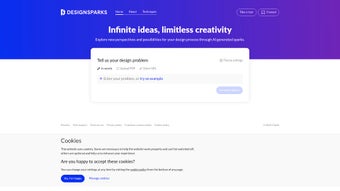
The platform accepts three flexible input methods: typing a concise design brief, pasting a URL that points to reference material, or uploading a PDF containing research, mood boards, or specifications. Once the AI analyses the input, it extracts key constraints and produces a curated list of ideas that respect circular design principles, a focus that aligns with the growing demand for waste‑prevention and product‑durability strategies. The recent showcase at the Design for Planet Festival 2023 highlighted how the app can accelerate the ideation phase for sustainable economies, delivering concepts that consider material loops, reusable components, and end‑of‑life scenarios.
Beyond idea generation, Design Sparks offers an interactive prompt library, curated knowledge bases, and contextual insights that help users deepen their critical thinking. The platform is cloud‑hosted, meaning there is no need for heavy local installations, and updates roll out automatically, guaranteeing that the AI stays current with the latest design trends and sustainability guidelines. Whether you are a UX/UI designer polishing a user flow, a product engineer sketching a new modular system, or a stakeholder seeking evidence‑based concepts for board presentations, Design Sparks acts as a collaborative partner that amplifies productivity and competitive edge.
Security and privacy are baked into the architecture: all data transfers are encrypted with TLS 1.3, PDFs are stored using end‑to‑end encryption, and the service complies with GDPR and ISO‑27001 standards. For teams that value rapid iteration, the tool also supports real‑time collaboration, allowing multiple users to view and comment on sparks simultaneously. In short, Design Sparks combines AI speed, methodological depth, and sustainable thinking into a single, easy‑to‑use service that can transform the early stages of any design project.
Key Features List
Design Sparks distinguishes itself through a rich set of capabilities that go far beyond a simple text generator. Each feature is engineered to support the full lifecycle of a design concept—from initial inspiration to collaborative refinement and final documentation. Below is a detailed look at the most valuable functions, followed by a concise, SEO‑friendly list that search engines can index.
- AI‑driven idea sparks: Generates concise, actionable design concepts based on user input, reducing brainstorming time dramatically.
- Multi‑modal input: Accepts typed briefs, web links, and PDF uploads for flexible research integration, ensuring no idea source is left behind.
- Circular design engine: Embeds waste‑prevention, durability, and product‑life‑cycle considerations into every suggestion, supporting sustainable outcomes.
- Interactive creativity prompts: Offers structured techniques (SCAMPER, Six Thinking Hats, TRIZ) to guide deeper exploration and methodical ideation.
- Curated knowledge hub: Accesses a library of case studies, sustainability guidelines, and trend reports, keeping users informed of industry best practices.
- Save & browse sparks: Organize generated ideas into collections, tag them, and revisit anytime, turning fleeting thoughts into reusable assets.
- Real‑time collaboration: Share spark collections with teammates via secure links, with permission controls for view‑only or edit access.
- Automatic updates: Cloud‑based platform receives continuous AI model improvements without user intervention, ensuring the latest capabilities are always available.
- Secure data handling: End‑to‑end encryption for uploaded PDFs and user‑generated content protects proprietary information.
- Cross‑device accessibility: Works on any modern browser, making it available on Windows, macOS, Linux, iOS, and Android, with a progressive‑web‑app mode for offline‑ready shortcuts.
These features are not merely a checklist; they represent a cohesive ecosystem that empowers designers to generate ideas faster, iterate smarter, and embed sustainability at the core of every concept. By leveraging AI while honoring proven creative frameworks, Design Sparks delivers a balanced blend of innovation and reliability that is rare in today’s crowded software market.
Installation & Usage Instructions
Because Design Sparks is a web‑app, the “installation” process is remarkably simple, yet the platform offers enough depth for power users who want to fine‑tune their workflow. Follow these steps to get started and make the most of the tool:
- Create an account: Visit designsparks.ai and click “Sign Up.” Register with an email address or use Google/Apple single‑sign‑on for faster onboarding.
- Verify your email: A confirmation link will be sent to your inbox. Click it to activate your account and unlock the full feature set.
- Select a subscription plan: The free tier provides up to 10 spark generations per month, while premium plans (monthly or annual) grant unlimited generation, priority AI processing, and advanced export options.
- Start a new project: From the dashboard, click “New Spark.” Choose one of three input options:
- Type your brief: Enter a short description of the design challenge (e.g., “Design a reusable coffee cup with a modular lid”).
- Paste a URL: Provide a link to a competitor’s product page, a trend article, or a sustainability report.
- Upload a PDF: Drag and drop research papers, mood boards, or specification sheets. The AI parses the document and extracts relevant constraints.
- Choose a creativity technique: Select a built‑in prompt (SCAMPER, Six Thinking Hats, TRIZ, etc.) to steer the AI’s perspective. This step aligns the sparks with your preferred problem‑solving methodology.
- Generate sparks: Click “Generate.” Within seconds, the AI returns a numbered list of ideas, each color‑coded for quick scanning. Click any spark to expand it, view supporting insights, or add personal notes.
- Save and organize: Bookmark a spark to add it to a collection. Collections can be named (e.g., “Circular Packaging Concepts”) and tagged for future retrieval.
- Share with collaborators: Use the “Share” button to generate a secure link or invite teammates via email. Set permissions (view‑only or edit) to maintain control over the ideation workflow.
- Export options: Premium users can export collections as CSV, PDF, or directly into design tools like Figma, Miro, and Adobe XD via API integrations.
The platform runs entirely in the browser, eliminating the need for large installers or complex system requirements. All you need is a stable internet connection and a modern browser (Chrome, Edge, Firefox, or Safari). For teams that require offline access, the premium plan includes a lightweight desktop wrapper built with Electron, which synchronizes with the cloud once you reconnect.
Tip: To maximize AI relevance, include specific constraints such as material limits, budget caps, or regulatory requirements in your brief. The more context you provide, the sharper and more targeted the sparks will be.
Compatibility, Pros & Cons, and Frequently Asked Questions
Compatibility
Design Sparks is built on responsive web technologies, making it fully compatible with the following operating systems and browsers. Because it is cloud‑hosted, you never need to manage version conflicts or driver updates.
- Windows 10/11 – Chrome, Edge, Firefox
- macOS 12+ – Safari, Chrome, Firefox
- Linux distributions with recent Chromium‑based browsers
- iOS 14+ – Safari, Chrome (optimized for touch interaction)
- Android 9+ – Chrome, Edge (includes a progressive web‑app mode for home‑screen shortcuts)
Pros
- AI generates highly relevant ideas quickly, reducing ideation time by up to 70 %.
- Built‑in sustainability lens ensures concepts align with circular economy goals.
- Multi‑modal input (text, URL, PDF) accommodates diverse research workflows.
- Secure cloud storage and end‑to‑end encryption protect proprietary design data.
- Free tier available for students and small teams, with a transparent premium upgrade.
- Real‑time collaboration and secure sharing streamline teamwork across locations.
Cons
- Dependence on internet connectivity; offline mode is limited to the premium desktop wrapper.
- AI suggestions may occasionally produce generic ideas that require further refinement.
- Advanced export integrations (Figma, Miro, Adobe XD) are locked behind the paid plan.
- Learning curve for users unfamiliar with structured creativity techniques.
Frequently Asked Questions
Is Design Sparks truly free to use?
Design Sparks offers a free tier that includes up to 10 spark generations per month, access to basic creativity prompts, and the ability to save collections locally. For unlimited usage, advanced export options, and priority AI processing, a paid subscription is required.
Can I upload confidential design documents?
Yes. All uploaded PDFs are encrypted in transit and at rest. The platform complies with GDPR and ISO‑27001 standards, ensuring that proprietary information remains confidential.
How does the circular design engine work?
The engine incorporates a knowledge graph of sustainability best practices, material lifecycles, and waste‑reduction strategies. When you submit a brief, the AI cross‑references this graph and surfaces ideas that prioritize reuse, recyclability, and durability.
Do I need any special hardware to run Design Sparks?
No special hardware is required. A modern web browser and a stable internet connection are sufficient. The optional desktop wrapper for offline work runs on any machine that meets the basic system requirements for Electron apps.
Is there a way to integrate Design Sparks with my existing design tools?
Premium users can export spark collections directly to Figma, Miro, and Adobe XD via API endpoints. Export formats also include CSV and PDF for easy import into other project‑management or documentation tools.
Conclusion & Call to Action
Design Sparks stands out in a crowded marketplace of AI chatbots by marrying rigorous creative methodologies with a sustainability‑first mindset. Its ability to ingest diverse inputs—text, links, PDFs—and return concise, actionable ideas makes it an indispensable ally for designers who need to stay ahead of trends while honoring circular economy principles. The free tier offers a risk‑free entry point for students and small teams, while the premium subscription unlocks the full power of real‑time collaboration, advanced export, and unlimited spark generation.
If you are looking to accelerate your ideation process, reduce brainstorming fatigue, and embed sustainable thinking into every concept, download Design Sparks today. Sign up, generate your first spark, and experience how AI can transform the way you create.
Pros: rapid idea generation, sustainability focus, flexible input, secure cloud storage, real‑time collaboration.
Cons: limited offline capability, premium price for full integrations, learning curve for structured techniques.



.png)



